Your Proxmox Cluster Deserves Better Than a Pinched, Zoomed-Out Web UI
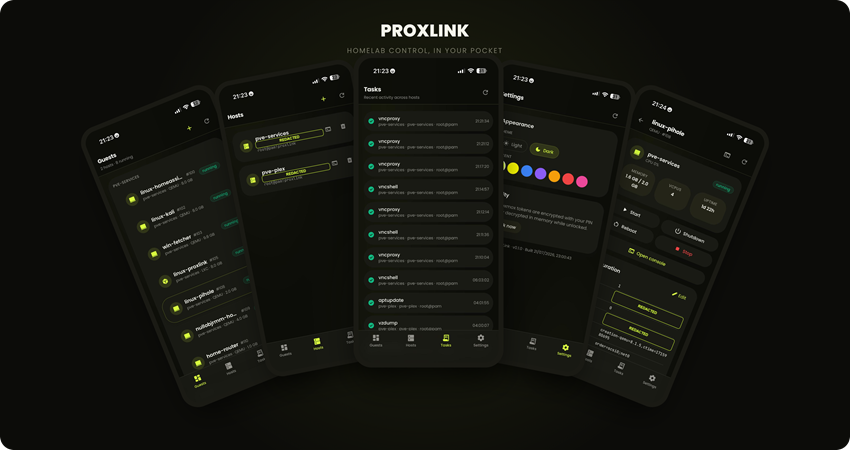
Something breaks at 11pm. A VM won't respond. You're in bed, so you pull up Proxmox's web UI on your phone, and what follows is a small ordeal: pinch-zooming into a dashboard built for a 27-inch monitor, scrolling sideways to find a button, hoping the console session doesn't time out before you manage to tap the right pixel. Proxmox VE is genuinely good server software. Its web interface, on a phone, was never built for this. That gap is why ProxLink exists.
The actual problem is that Proxmox's web UI is a heavyweight ExtJS app. It assumes a mouse, a wide screen, and the patience to navigate a deep tree of nodes, storage, and guests. On a phone, none of that holds. Buttons shrink to nothing. The layout doesn't reflow. And the second you open a console to see why a VM won't boot, you're wrestling a desktop VNC client crammed into a fraction of its intended space, no on-screen keyboard bridge, no way to actually read what's on screen.
None of this is a knock on Proxmox. It's mature hypervisor software and the web UI does its job well on the hardware it was designed for. It just wasn't designed to be a phone app, and homelab admins increasingly want to check on their servers the same way they check everything else now: from their pocket.
What ProxLink does is sit in front of one or more Proxmox hosts, or whole clusters, as a self-hosted, mobile-first PWA that gives you the slice of the web UI you actually reach for on a phone. Redesigned for a thumb instead of a mouse.
A real dashboard replaces the tree view: every VM and container across every host you've connected, grouped and status-badged, readable in one scroll. Guest controls are sized to actually tap, start, stop, reboot, shutdown, with a confirmation step before anything destructive. A create wizard spins up a new VM or LXC container without touching a desktop at all, including pulling an ISO or template straight from a URL into Proxmox storage. Snapshots and backups trigger from the guest's own page.
Then there's the console, which took the most work to get right. VNC and terminal sessions ask the guest to resize to match your actual screen instead of showing you a shrunken desktop. Pinch-to-zoom covers the moments you need to read something small. And since phone keyboards have no Tab key and no arrow keys, there's an on-screen toolbar that sends them directly, so shell history and tab-completion still work from a touchscreen. There's also a node shell, for when you need the hypervisor itself, not just a guest. It's a PWA, so adding it to your home screen makes it behave like a native app, icon included. No App Store.
Security matches what's at stake here, since this app holds credentials that can control your whole infrastructure. It sits behind a PIN. Your Proxmox API tokens are encrypted at rest with AES-256-GCM, and the decryption key exists only in memory, only while the app is unlocked. Every Proxmox call goes through an allowlisted proxy rather than arbitrary passthrough. TLS certificates get fingerprint-pinned, so a typical self-signed homelab cert doesn't mean disabling verification entirely. And the ISO-download feature has its own guard against SSRF, because "fetch a URL server-side" is exactly the kind of convenience that turns into a hole if nobody thinks about it.
It was never going to be a SaaS product, and being self-hosted is deliberate. It talks directly to your Proxmox hosts, so it runs where those hosts live: your network. The fast path is a one-line installer that spins up a small LXC on the Proxmox box itself, installs Docker, and hands you a URL in a couple of minutes. Prefer a NAS or a spare mini PC? One docker compose up gets you there just as fast.
Where it stands right now is a working v1: multi-host dashboards, full guest lifecycle, config editing, create wizards, snapshots, backups, console access for VMs and containers, and a watchdog that can tell the difference between "the container is down" and "Docker's networking quietly broke after a host OS upgrade." That second failure mode is real. I learned it needed explicit handling the hard way, because homelab failures rarely match what you'd predict from a whiteboard.
More is planned: live monitoring, push notifications, cluster and firewall administration. But the core loop already works. Check your guests, fix what's broken, open a console that doesn't fight you, all from a phone. If you run Proxmox and have ever sworn at its mobile web UI at an inconvenient hour, it's worth a look: github.com/BeardedTech0o/prox-link.